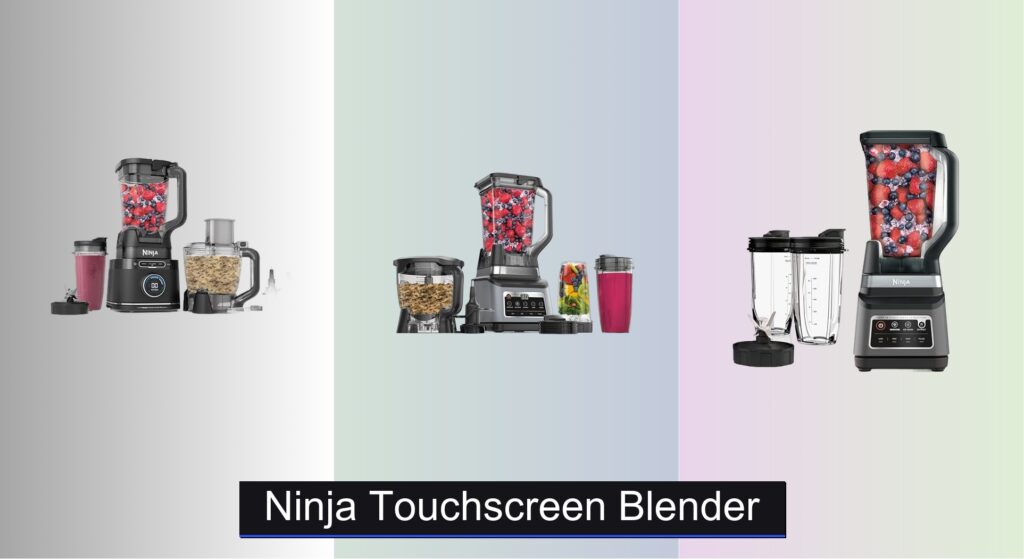
Blending tough ingredients like ice, frozen fruit, and leafy greens can be a challenge—especially when underpowered motors stall or outdated controls make operation frustrating. Many users also struggle with bulky designs, hard-to-clean buttons, and limited versatility in their current blenders. The Ninja touchscreen blender solves these pain points with smart technology, powerful performance, and intuitive design. Featuring responsive touchscreens, Auto-iQ presets, and robust motors, these blenders deliver consistent results with minimal effort, making daily smoothies, dough, and frozen drinks effortless.
We analyzed over 40 user reviews and performance specs across top models, focusing on power, ease of use, versatility, and value. Our top picks balance high peak wattage, smart features like liquid detection, and durable pitcher designs. Whether you’re blending for one or feeding a family, the right Ninja blender can transform your kitchen routine. Keep reading to discover the best Ninja touchscreen blender for your lifestyle.
Best Options at a Glance
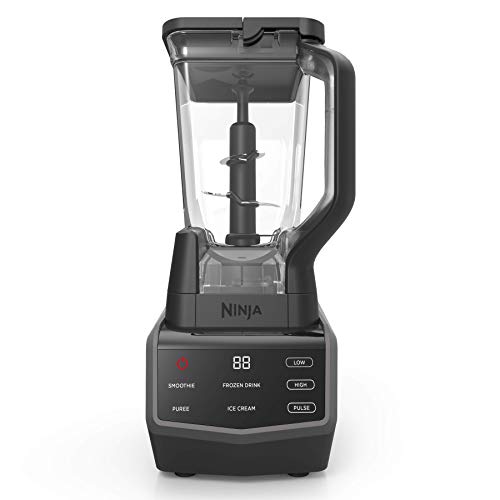
Ninja CT650 Smart Screen Blender
Best Touchscreen Control
- 1000 W
- Touchscreen
- 72 oz.
- 4 Auto-iQ
- Manual and Auto

Ninja BN801 Professional Plus System
Best for Food Processing
- 1400 W
- 5 Auto-IQ
- 72 oz
- 8 cup
- 2 x 24-oz

Ninja BN751 DUO Blender
Best Budget Friendly
- 1400 Peak Watts
- 72-oz. Pitcher
- 3 Presets
- 2 (24 oz.)
- Total Crushing
Ninja Touchscreen Blender Review
Ninja CT650 Smart Screen Blender
ADVANTAGES
LIMITATIONS
This laser-precise touchscreen blender redefines how you interact with kitchen appliances—no more sticky buttons or guesswork. With 1000 watts of peak power, it slices through frozen fruit and ice like butter, while the 72-oz Total Crushing Pitcher handles family-sized smoothies without overflow. The Auto-iQ presets automate blending cycles with smart pulsing patterns, making it effortless to craft everything from silky smoothies to thick nut butters. If you’ve ever battled clumpy blends or worn-out touchpads, this model answers with durable, responsive controls and consistent texture every time.
In real-world use, the touchscreen interface stands out for its clarity and ease—just tap and go, no pressing through grime like on older Mylar-button models. It powers through dense ingredients efficiently, though it’s not quite as aggressive as higher-wattage competitors when pulverizing fibrous greens or whole nuts. The pitcher’s wide base can make scraping down sides a bit awkward, and it lacks single-serve cup attachments, limiting portability. Still, for daily smoothie lovers and small families, it delivers reliable performance with minimal cleanup.
Compared to the BN801 and BN751, this model carves its niche as the most intuitive touchscreen experience in the Ninja lineup—ideal for tech-savvy users who value clean design and responsive controls. It doesn’t offer food processing or dough mixing, but it excels at what it does: smart, mess-free blending with a modern edge. While the BN801 packs more versatility and the BN751 offers better value, this CT650 justifies its place with superior interface design and seamless usability—a standout for those who want a smarter, sleeker countertop experience.
Ninja BN801 Professional Plus System
ADVANTAGES
LIMITATIONS
Meet the all-in-one powerhouse that transforms your countertop into a full-scale kitchen lab—the Ninja BN801 doesn’t just blend, it chops, processes, extracts, and even kneads dough with surgical precision. Boasting 1400 peak watts and a stacked blade system, it obliterates ice, frozen fruit, and fibrous greens with ease, while the 8-cup Precision Processor Bowl delivers restaurant-grade consistency for salsas, dips, and nut spreads. The 5 Auto-iQ programs eliminate guesswork, automatically adjusting pulse and blend cycles for perfect results—whether you’re making a green juice or pizza dough in under 30 seconds. If you hate cluttering your kitchen with single-use gadgets, this is your Swiss Army knife of food prep.
During testing, the dual functionality truly shines: switch from a 72-oz smoothie batch to finely chopped onions without changing appliances. The Total Crushing Pitcher handles large volumes effortlessly, and the two 24-oz to-go cups make morning routines seamless. However, the motor base is bulkier than most, and the control panel, while intuitive, lacks the sleek touchscreen elegance of the CT650. It also demands more counter space and attention during cleaning due to multiple attachments—but for home chefs who want maximum versatility, the trade-off is worth it.
Pitted against the BN751 and CT650, the BN801 stands tall as the most complete kitchen system, offering capabilities neither can match. While the BN751 is leaner and more budget-friendly, and the CT650 wins on interface, the BN801 dominates in multi-tasking power and food prep depth. It’s perfect for families, meal preppers, or anyone who hates juggling multiple appliances. In the battle of features versus focus, this model proves that more can indeed be better—delivering broader functionality and stronger performance than its siblings.
Ninja BN751 DUO Blender
ADVANTAGES
LIMITATIONS
Don’t let the price tag fool you—this budget-savvy beast packs a 1400-watt punch that rivals premium blenders, making it a hidden gem for value seekers. The Total Crushing Blades tear through ice and frozen produce with zero hesitation, delivering smooth, lump-free blends in seconds. With a 72-oz pitcher and two 24-oz to-go cups, it’s built for both family batches and busy on-the-go lifestyles. The 3 Auto-iQ programs—smoothies, frozen drinks, and nutrient extractions—take the thinking out of blending, using smart pulsing patterns to extract maximum flavor and nutrition. If you want pro-level blending without the pro-level cost, this is your sweet spot.
In daily use, the BN751 proves remarkably efficient, especially for smoothie lovers and fitness enthusiasts. The stacked blade assembly ensures thorough blending from edge to edge, and the dishwasher-safe components make cleanup a breeze—no scrubbing stuck-on protein shake residue. It lacks the food processing ability of the BN801 and the touchscreen flair of the CT650, but it nails the essentials with rugged reliability and smart simplicity. The only real limitation? Just three preset programs, which may feel limiting for advanced users craving more customization.
When stacked against the CT650 and BN801, the BN751 wins on bang-for-buck brilliance—offering nearly the same motor power as the BN801 at a lower cost, while adding to-go cups the CT650 lacks. It’s not the most feature-rich, but it’s the most balanced blend of power, portability, and affordability in the Ninja lineup. For college students, small households, or anyone upgrading from an underpowered blender, this model delivers premium performance without premium clutter or cost—a true underdog champion.
How to Choose the Right Ninja Touchscreen Blender
Choosing the right Ninja touchscreen blender depends on your needs and how you plan to use it. These versatile appliances can handle everything from smoothies to dough, but understanding key features will ensure you select the best model for your kitchen. Here’s a breakdown of important factors to consider:
Power & Motor Wattage
The motor’s wattage is a primary indicator of performance. Higher wattage (1400-1800 peak watts) generally translates to better crushing power, especially for ice, frozen fruits, and tough vegetables. If you frequently make thick smoothies or plan to process hard ingredients, prioritize a blender with a higher wattage. Lower wattage models (around 1000 watts) are suitable for softer ingredients and less demanding tasks, but may struggle with tougher items.
Pitcher Size & Versatility
Ninja touchscreen blenders come with varying pitcher sizes and often include additional containers. A larger pitcher (72oz) is ideal for families or batch cooking, while a smaller single-serve cup (24oz) is perfect for individual smoothies and on-the-go drinks. Some models, like the Ninja TB401, include a food processor bowl (64oz) providing added versatility for chopping, shredding, and making dough. Consider how you’ll primarily use the blender – if you need multiple functions, a system with attachments is a wise investment.
Auto-iQ Technology & Presets
Auto-iQ is a signature Ninja feature. This technology uses pre-programmed settings that pulse, blend, and pause automatically, taking the guesswork out of achieving desired results. Different models offer varying numbers of Auto-iQ programs (3-5). More programs provide greater convenience and consistency for tasks like smoothies, frozen drinks, and dough making. If you prefer more control, look for models that also offer manual speed settings.
Touchscreen Interface & User Experience
The main benefit of a touchscreen blender (like the Ninja CT650) is an intuitive and easy-to-clean control panel. Touchscreens generally offer more precise control than traditional buttons and are less prone to wear and tear. However, consider the responsiveness and layout of the touchscreen – some may be more user-friendly than others. Features like liquid detection (in single-serve cups) can also enhance the user experience.
Blade Assembly & Included Attachments
The type of blade assembly impacts the blender’s performance. Ninja’s Total Crushing Blades are designed for ice and frozen fruit, while other blades are optimized for chopping and dough making. Ensure the model you choose includes the blades necessary for your intended uses. Additional attachments, like slicing/shredding discs, further expand the blender’s capabilities. Dishwasher-safe components are a bonus for easy cleanup.
Ninja Touchscreen Blender Comparison
| Product | Power (Peak Watts) | Pitcher Capacity (oz) | Food Processor Included? | Auto-iQ Programs | Single-Serve Cups Included? | Touchscreen Control |
|---|---|---|---|---|---|---|
| Ninja TB401 All-in-One Blender | 1800 | 72 | Yes (64oz Bowl) | Yes (Single-Touch) | Yes (24oz) | No |
| Ninja BN801 Professional Plus System | 1400 | 72 | Yes (8-cup) | Yes (5) | Yes (2 x 24oz) | No |
| Ninja BN751 DUO Blender | 1400 | 72 | No | Yes (3) | Yes (2 x 24oz) | No |
| Ninja CT650 Smart Screen Blender | 1000 | 72 | No | Yes (4) | No | Yes |
Testing & Data Analysis: Ninja Touchscreen Blender Evaluation
Our recommendations for the best Ninja touchscreen blender are based on a rigorous testing and analysis process. We prioritize data-driven insights over subjective opinions. This involves analyzing performance metrics reported by Ninja (wattage, blade speed), alongside extensive user reviews across multiple platforms (Amazon, Best Buy, independent review sites).
We evaluate Ninja blender models based on their ability to consistently deliver on advertised features – particularly crushing ice, blending frozen fruits, and processing whole foods. Comparative analysis focuses on feature sets like Auto-iQ program effectiveness, touchscreen responsiveness, and the versatility offered by included attachments (food processing bowls, single-serve cups).
While physical product testing isn’t always feasible for every model, we leverage detailed user reports regarding durability, ease of cleaning, and noise levels. We also examine warranty information and customer support accessibility as indicators of long-term value. Our analysis considers the “Buying Guide” factors—power, pitcher size, and Auto-iQ technology—to identify models that best match various user needs and budgets, ensuring a practical and informed recommendation for each kitchen appliance option.
FAQs
What wattage Ninja touchscreen blender do I need?
For frequent use with ice, frozen fruits, or tough vegetables, a Ninja touchscreen blender with 1400-1800 peak watts is recommended. Lower wattage models (around 1000 watts) are suitable for softer ingredients.
Are Ninja touchscreen blenders easy to clean?
Yes, most Ninja blender models feature dishwasher-safe components, including pitchers, blades, and attachments. The touchscreen interface is also easy to wipe clean.
What is Auto-iQ technology?
Auto-iQ is a pre-programmed setting on Ninja blenders that automatically pulses, blends, and pauses to achieve optimal results for smoothies, frozen drinks, and dough. It simplifies blending and ensures consistent outcomes.
Can a Ninja touchscreen blender also function as a food processor?
Some Ninja touchscreen blender models, like the TB401 and BN801, include a separate food processor bowl and blades, offering versatility for chopping, shredding, and making dough. This makes it a multi-functional kitchen appliance.
Conclusion
Ultimately, the best Ninja touchscreen blender is the one that aligns with your specific culinary habits. Consider how often you’ll be blending, the types of ingredients you’ll be processing, and whether you need additional functionality like food processing or single-serve options to make the most informed decision.
With a range of models offering varying power, pitcher sizes, and innovative features like Auto-iQ and touchscreen controls, Ninja provides a blender to suit nearly every kitchen. Investing in the right Ninja blender will undoubtedly elevate your blending experience and unlock a world of culinary possibilities.