That half-empty can of compressed air sitting in your desk drawer—how many more cleanings does it actually have left? The frustrating truth is that how long a can of air duster lasts depends entirely on your technique, not shelf life. Most users drain a $5 can in one overzealous cleaning session, while smart technicians stretch the same can across six months of maintenance. This isn’t about time on the shelf—it’s about the precise number of seconds you squeeze from that nozzle before it sputters out.
Here’s what manufacturers won’t tell you: A standard 10-ounce can contains only 90-120 seconds of total spray time. That’s less than two minutes of continuous blast—enough for 30 keyboard cleanings if you use it right, or just one PC deep clean if you spray recklessly. The difference between getting 6 months or 6 uses comes down to three critical factors: your spray duration, can angle, and storage conditions.
In this guide, you’ll discover exactly how many computer cleanings you get per can, why tilting the nozzle wastes 40% of your propellant, and the professional technique that makes air dusters last 3x longer. Stop guessing and start maximizing every second of spray time—your next cleaning session depends on it.
10oz vs 20oz: Real Spray Time Differences Revealed

Don’t be fooled by can size alone—your actual usable spray time varies dramatically between standard consumer cans and industrial models. A typical 10-ounce air duster delivers precisely 90-120 seconds of total spray time when used correctly, while the larger 20-ounce “pro” version provides 240-360 seconds. But here’s what matters: how long does a can of air duster last in your specific workflow?
Why Keyboard Cleanings Use 90% Less Air Than PC Cleanings
Cleaning a desktop PC requires 15-30 seconds of targeted bursts per session—enough to clear heat sinks, fan blades, and filters. With a 10-ounce can, that means only 4-6 full computer cleanings before it’s empty. But for keyboard maintenance? You need just 2-3 seconds per session to blast crumbs from between keys. That same can becomes a 30-60 session powerhouse—lasting 2.5 years with monthly use. The math is brutal: one deep PC clean equals 10 keyboard sessions.
Industrial Cans: When 50+ Ounces Still Run Out Fast
For server rooms or workshops, industrial 50+ ounce cans offer 600+ seconds of spray time. But here’s the catch: mechanics cleaning engine parts often use 10-15 second continuous blasts, draining these “endless” cans in under 40 minutes of actual use. Never assume bigger means infinite—your usage pattern always trumps can size.
Short Burst Technique: How 1-2 Seconds Saves Your Can
Continuous spraying is the #1 reason air dusters die prematurely. When you hold the trigger down for more than 2 seconds, two critical failures occur: the can temperature plummets below -60°F, causing propellant to freeze on electronics, and liquid refrigerant squirts out instead of gas. This wastes 70% of your remaining spray time in one reckless pass.
Why 15-Second Pauses Make Your Can Last 3x Longer
After each 1-2 second burst, pause for 15-30 seconds. This lets the can’s internal pressure rebuild while preventing dangerous temperature drops. Test this yourself: spray for 2 seconds, wait 15 seconds, repeat. You’ll maintain consistent blast power through 80% of the can’s life. Spray continuously, and by the halfway point, you’ll get weak, icy bursts that damage components.
The Straw Attachment Secret Every Pro Uses
That red plastic tube isn’t just for show—it concentrates airflow into a surgical blast that cleans 3x faster. Without it, you’re wasting spray time covering wider areas with weaker pressure. Snap it on, hold it 2 inches from grime, and use 1-second bursts. You’ll clear stubborn dust in half the time, preserving precious seconds for future cleanings.
Why Tilting Your Can Wastes Propellant Instantly
Holding your air duster at a 45-degree angle seems logical for hard-to-reach spots, but it triggers catastrophic propellant loss. When tilted beyond vertical, liquid refrigerant floods the nozzle instead of gas. You get one powerful “whoosh” followed by rapid pressure drop—and 30% of your can vanishes in that single spray.
The Upright Rule: How 90 Degrees Prevents Premature Death
Keep the can perfectly vertical during every burst. This ensures only gas exits the nozzle, maintaining consistent pressure throughout the can’s life. If you need to clean underneath components, reposition the device—not the can. Professionals using this method consistently get 6 full PC cleanings from a 10-ounce can; tilting users get 3.
Frosting Danger: When Your Angle Damages Electronics
Tilting doesn’t just waste air—it risks destroying what you’re cleaning. Liquid propellant hitting hot circuits causes instant frosting that cracks solder joints. If you see white ice forming during cleaning, stop immediately. That can is now compromised, and future sprays will deliver inconsistent pressure until failure.
Keyboard Cleaning: How 6 Months to 1 Year From One Can
For most home users, air dusters live and die by keyboard maintenance. The key to stretching a single 10-ounce can across 6-12 months? Precision targeting. You need only 2-3 seconds per session: 1 second for the keyboard, 1 for the mouse, 1 for monitor vents. Any longer and you’re wasting propellant.
Monthly Maintenance That Actually Works
Flip your keyboard upside down first to dump loose debris. Then, with straw attached, use three 1-second bursts at 45-degree angles between keycaps. Never spray downward—that traps moisture under keys. This method clears crumbs without moisture buildup, preserving both your can and your electronics.
When Monitor Cleaning Drains Your Can Fast
New users often waste air duster seconds on monitor screens—big mistake. LCDs need zero compressed air; the blast can damage pixel arrays. Use microfiber cloths instead. Redirect those 10+ seconds per session toward actual dust traps like USB ports or speaker grilles where air dusters belong.
PC Deep Cleaning: Why One Can Only Handles 4-6 Sessions
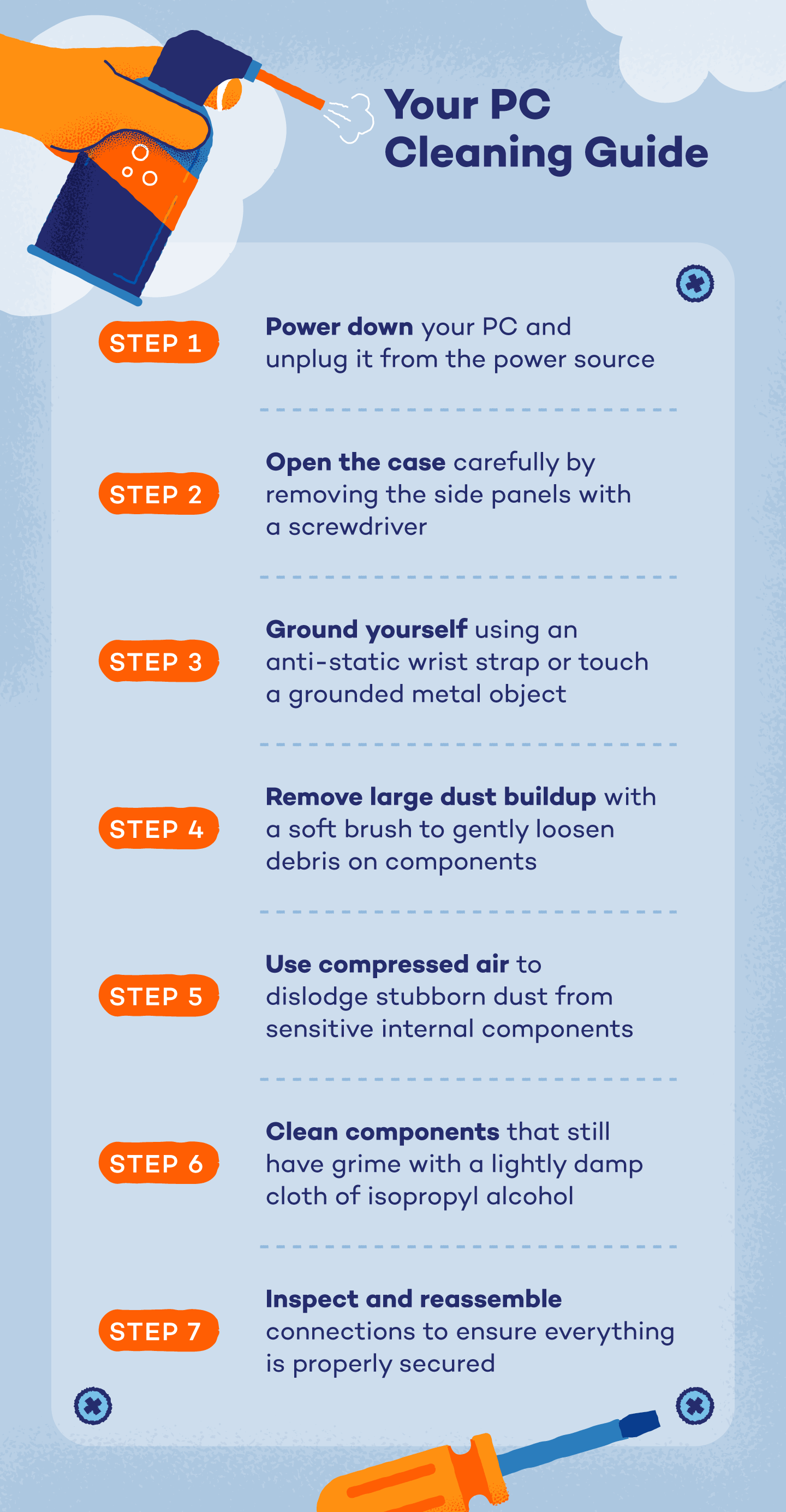
Building your first gaming rig? That shiny 10-ounce can won’t survive your inaugural cleanout if you’re not careful. A thorough desktop PC cleaning consumes 15-30 seconds of spray time: 5 seconds for CPU cooler fins, 8 for GPU fans, 7 for case filters. At this rate, you’ll max out at 4-6 cleanings before the can sputters.
Heat Sink Cleaning That Preserves Your Can
Clogged heatsinks demand the most air duster time—but you can slash usage by 40%. Instead of blasting vertically through fins, angle the straw parallel to the fins and use 2-second bursts from multiple sides. This dislodges dust with half the spray time compared to head-on attacks that just pack debris deeper.
The Power Supply Trap That Kills Cans Fast
Never spray directly into power supply vents. The dense filter inside requires 10+ seconds of continuous spray to clean—guaranteeing propellant waste and frosting risk. Remove the PSU first, clean filters with a soft brush, then use 3-second bursts on external vents only. This cuts PSU cleaning time to 5 seconds max.
Storage Secrets: Preventing Premature Air Duster Failure
An unopened can stored improperly loses 20% of its pressure in 6 months—even before first use. Room temperature (65-75°F) is non-negotiable; garages and cars destroy cans. At 90°F+, internal pressure spikes dangerously, while below 50°F causes weak spray from the first burst.
The Upright Storage Rule You’re Ignoring
Store cans vertically in a dark cabinet—not on their side in a drawer. Horizontal storage allows propellant to leak past seals over time. Check your half-used can from last year: if it feels lighter than a new one, improper storage bled it dry. Properly stored unopened cans last 3-5 years; neglected ones fail in 12 months.
Altitude and Humidity: Silent Can Killers
Above 5,000 feet elevation, reduced atmospheric pressure causes weaker blasts—requiring 20% more spray time per task. In 80%+ humidity, moisture condenses inside nozzles, causing clogs that waste propellant. If you live in mountains or tropics, buy smaller cans and use them faster to avoid performance issues.
4 Expert Techniques to Triple Your Can’s Usable Life
Shake Only When Required—Never Mid-Use
Check your can’s label: “no-shake” formulas lose effectiveness when agitated. For shakable types, do it once before opening—not between sprays. Mid-session shaking destabilizes pressure, causing inconsistent blasts that require extra spraying to clean the same area.
Warm Chilled Cans Before Spraying
Grabbed a cold can from the garage? Let it sit 20 minutes at room temperature. Spraying while cold gives weak initial bursts that trick you into over-spraying. Properly warmed cans deliver full pressure from the first trigger pull, eliminating wasted test sprays.
Test Spray on Your Hand First
Before aiming at electronics, do a 1-second test spray onto your palm. If it feels icy cold, the can is too cold or tilted—wait 30 seconds. This prevents accidental frosting on components and avoids the wasted time of cleaning up ice damage later.
Replace Straws Immediately After Use
Leaving the straw snapped on invites moisture buildup inside the nozzle. After each use, remove it and store separately. A clogged nozzle forces you to spray longer to achieve results—draining your can 25% faster over time.
Electric Duster vs Canned Air: Long-Term Cost Reality
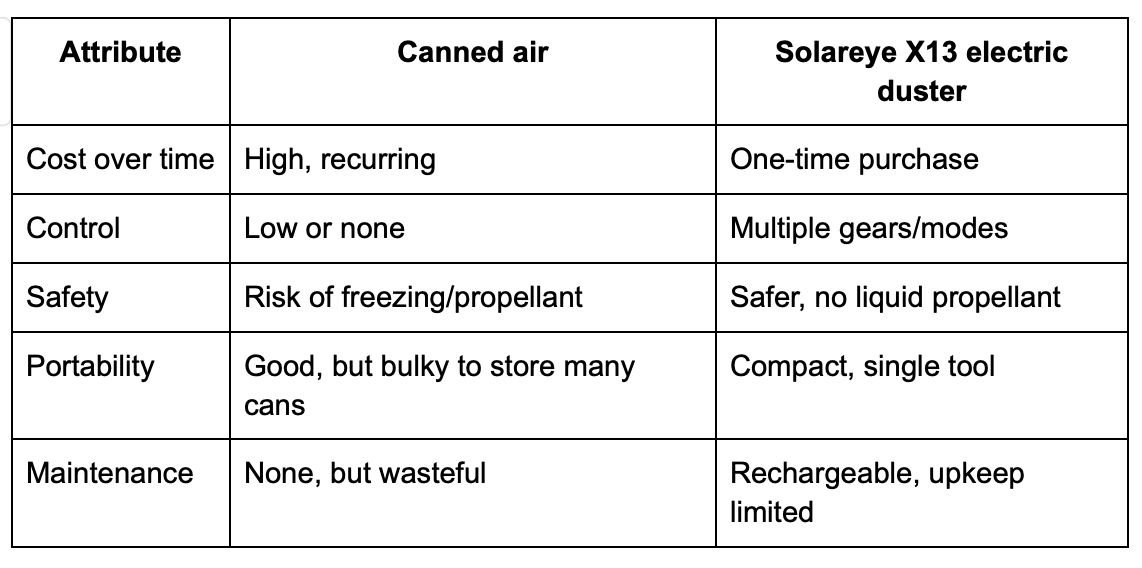
That $20 electric duster pays for itself after just 4 PC cleanings. A 10-ounce can costs $5 and handles 4-6 cleanings ($1.25 per clean), while electric models cost pennies per use. But for occasional keyboard cleaning? Canned air wins—you’d rarely justify firing up an electric unit for 2 seconds of work.
When Canned Air Still Makes Sense in 2024
For field technicians servicing multiple devices daily, industrial 20-ounce cans ($12) become cost-effective at 15+ keyboard cleanings per day. But for home users doing quarterly PC maintenance? Switch to electric after your current can empties—it’s the last can you’ll ever buy.
The Environmental Truth No One Mentions
Modern canned air uses eco-friendly propellants, but recycling remains problematic. Most curbside programs won’t accept partially full cans. Once empty, puncture the can per EPA guidelines and recycle the metal shell. Electric dusters win here—zero waste after 10+ years of use.
How Long Does a Can of Air Duster Last? The Final Verdict
Your 10-ounce air duster holds exactly 90-120 seconds of usable spray—no more, no less. How long does a can of air duster last in practice? For keyboard maintenance: 6-12 months with monthly 2-second cleanings. For PC deep cleans: only 4-6 sessions before it’s empty. The difference lies entirely in your technique.
Master these three rules to maximize every can:
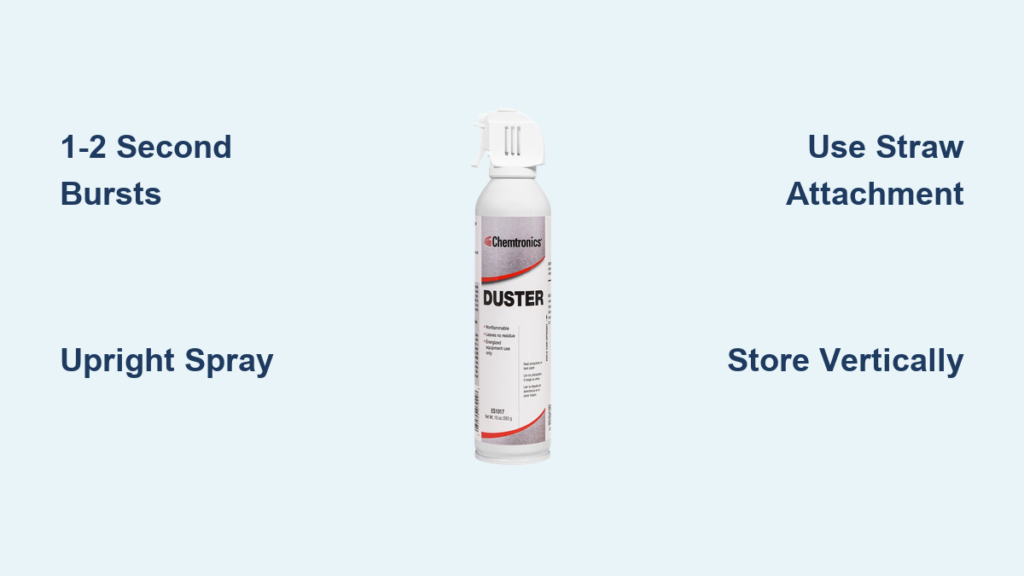
1. Always spray upright in 1-2 second bursts with 15-second pauses
2. Use the straw attachment for surgical precision
3. Store vertically at room temperature away from sunlight
Stop replacing cans monthly. Start cleaning like a pro—making every second of compressed air count. Your next can should outlast your next two PC upgrades if you use it right. And when it finally runs out? Switch to electric for true long-term savings. Your wallet (and workspace) will thank you.