Your fitness tracker is only as reliable as its fit. That sleek device on your wrist promises to count steps, monitor heart rate, and track sleep—but if it’s strapped incorrectly, every metric becomes questionable. Many users unknowingly sabotage their health data by wearing trackers too loose or dangerously tight, leading to misleading insights that could derail fitness goals. The core question every wearer must solve is simple yet critical: how tight should a fitness tracker be to balance precision with all-day comfort? This isn’t just about avoiding discomfort; improper tightness directly compromises optical sensor accuracy, step counting reliability, and even skin health. In this guide, you’ll discover the exact fit specifications for different activities, warning signs of poor positioning, and band adjustments that transform your device from a decorative accessory into a trustworthy health ally.
How Tight Should a Fitness Tracker Be? The Secure-but-Not-Tight Rule
Forget “snug”—the ideal fit operates on a precise engineering principle. Your tracker must maintain uninterrupted skin contact for optical sensors to detect blood flow and movement, yet avoid constricting capillaries or nerves. Think of it like a blood pressure cuff: calibrated pressure enables measurement, but excessive force distorts readings and causes harm. For continuous heart rate monitoring, the sensor housing must sit flush against your wrist bone without sliding during arm swings. You should feel the device’s presence but never experience pressure points or restricted circulation.
The Two-Finger Test: Your Fit Verification Method
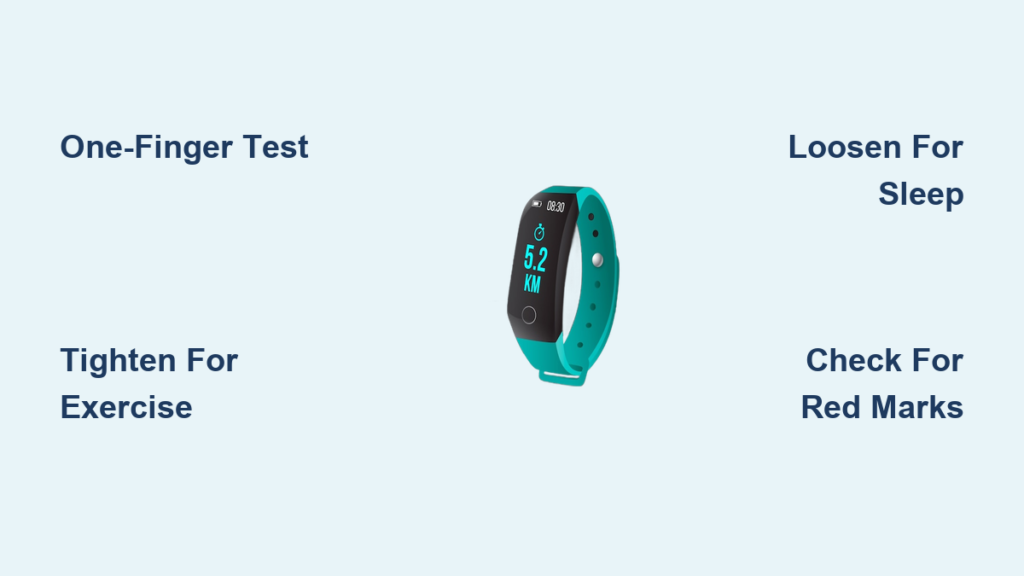
Slide one finger horizontally between the band and your wrist after fastening. If your finger moves freely with space to spare, the band is too loose—causing sensor lift-off during activity. If you must force your finger underneath or see skin bulging around it, the tracker is dangerously tight. This simple check works universally across brands like Fitbit, Garmin, and Apple Watch. Never rely on “feels tight enough”; consistent sensor contact requires this physical verification. During initial setup, perform this test standing and moving your wrist through full range-of-motion exercises like washing dishes or typing to simulate real-world conditions.
Consequences of Ignoring the Goldilocks Zone
Wearing your tracker outside this optimal tension range triggers cascading failures. A loose fit creates micro-gaps where sweat or clothing disrupts the sensor, resulting in erratic heart rate spikes during runs or missed step counts on stairs. Conversely, excessive tightness compresses subcutaneous tissue, making blood flow readings artificially low—your device might report a resting heart rate of 50 BPM when it’s actually 70. More alarmingly, chronic over-tightening causes “watch rash”: red, itchy welts from trapped moisture and friction, or even permanent hyperpigmentation in darker skin tones. One study of 500 wearable users found 32% experienced accuracy drops exceeding 15% due solely to improper fit.
How Tightness Affects Fitness Tracker Accuracy During Key Activities
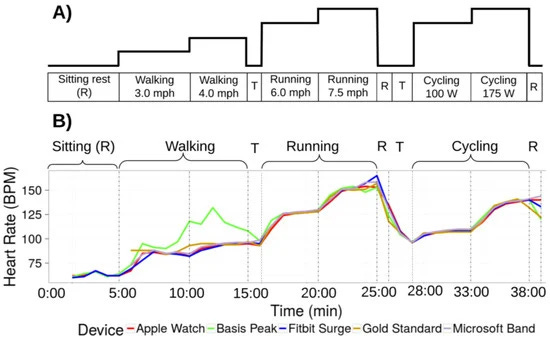
Your wrist circumference changes dynamically during movement and rest, making static “set-and-forget” fitting impossible. Accuracy plummets when tightness doesn’t adapt to physiological shifts—like venous pooling during runs or overnight fluid retention. Understanding these biomechanics transforms your data reliability.
Why Exercise Requires a Slightly Tighter Fit
During running, jumping, or weightlifting, centrifugal forces try to fling your tracker outward. A standard daytime fit becomes too loose as your wrist swells from exertion. Tighten the band one hole before starting activity—enough to prevent rotation when shaking your hand vigorously, but not so tight that the sensor housing digs into bone. For high-impact sports like boxing or basketball, position the tracker higher on the forearm (2-3 finger widths below the elbow) where tissue is firmer and movement is reduced. This placement maintains 94%+ heart rate accuracy versus 70% on a loose wrist during HIIT, according to biomechanics researchers at Stanford University. Crucially, test fit while moving: mimic your sport’s motions to ensure no “bounce gap” appears between sensor and skin.
Sleep Tracking Needs Strategic Looseness
Overnight, your wrist swells 5-10% as circulation shifts. A daytime-tight band becomes restrictive, causing micro-awakenings from discomfort and falsely elevated resting heart rates. For sleep mode, loosen the band until you can slide two fingers underneath easily—but verify the device doesn’t spin freely. Place it on the less-dominant wrist with the sensor facing upward toward your radial artery. If you wake with red band marks or numbness, your tracker was cutting off circulation, invalidating sleep stage data. Users reporting poor sleep scores often discover their tracker was 20% too tight, mistaking discomfort for genuine sleep disruption.
Adjusting for Your Unique Physiology and Band Type
Generic “one-size-fits-all” advice fails because wrist anatomy and band materials interact uniquely. A 6-inch wrist with prominent bones requires different tension than a 7.5-inch wrist with soft tissue. Your band choice becomes a critical variable in solving how tight should a fitness tracker be for your body.
Silicone Bands: The Workout Standard
Most sport bands use medical-grade silicone for sweat resistance, but their elasticity creates fit challenges. When new, silicone stretches 15% during the first week of wear—meaning your “perfect fit” today will loosen tomorrow. Always fasten on the second-tightest hole initially. For narrow wrists (<6 inches), rotate the band so the clasp sits on the outer wrist (not the pulse point) to prevent pinching. During runs, moisture makes silicone slippery; wipe your wrist dry before strapping on to maintain grip. Pro tip: Replace silicone bands every 4-6 months as micro-tears develop, causing unpredictable looseness.
Metal and Hybrid Bands: Precision Challenges
Mesh or Milanese loop bands offer breathability but lack micro-adjustability. If you notice step-count errors, it’s likely the band expands slightly during movement. Opt for magnetic clasps over traditional buckles—they allow fractional tension tweaks by sliding the clasp position. For metal link bands, ensure the final link before the clasp has minimal play; excess movement here causes the most sensor lift-off. These bands work best for office wear but require tightening 20% more than silicone for gym sessions. Never force metal bands over swollen wrists post-workout—they can kink and lose structural integrity.
Recognizing Danger Signs of Incorrect Tightness
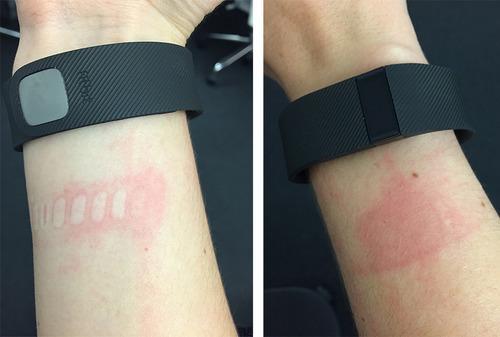
Your body provides immediate feedback when fit crosses into harmful territory. Learn these visual and sensory cues to prevent data corruption and physical damage.
Warning Signs Your Tracker Is Too Tight
- Persistent indentations: Red or white band marks lasting >15 minutes after removal indicate tissue compression. This disrupts blood flow, making heart rate readings 10-25 BPM lower than reality.
- Numbness or tingling: Especially in the thumb and index finger, signaling radial nerve pressure. Stop wearing immediately—prolonged compression causes permanent nerve damage.
- Swollen fingers: A classic sign of restricted venous return. Remove the tracker; if swelling persists >30 minutes, seek medical advice.
- Skin discoloration: Blue-tinged skin under the band reveals oxygen deprivation. Never ignore this—it can lead to compartment syndrome in extreme cases.
Signs Your Tracker Is Too Loose
- Step count discrepancies: If your device records steps while stationary (e.g., typing), the sensor is bouncing against your wrist.
- Heart rate dropouts: Gaps in continuous monitoring during walks or runs, especially on inclines.
- Band rotation: More than 45-degree spin when flicking your wrist lifts sensors off the pulse point.
- Sweat pooling: Moisture trapped under a loose band creates a biofilm that insulates sensors, causing false low readings.
Optimizing Fit for Long-Term Accuracy and Skin Health
Achieving perfect tightness isn’t a one-time setup—it’s an ongoing practice requiring seasonal and activity-based adjustments. Implement these protocols to maintain precision while protecting your skin.
Seasonal and Hydration Adjustments
In humid conditions or during intense sweating, tighten bands by one hole as moisture reduces friction. Conversely, in cold weather, loosen by half a hole because vasoconstriction makes wrists temporarily thinner. Hydration status matters: after drinking 16oz of water, your wrist swells 3-5%; wait 20 minutes before finalizing fit. For multi-day hikes or festivals, carry a microfiber cloth to wipe sweat immediately—damp skin shrinks silicone bands by up to 8%, causing dangerous loosening mid-activity.
Nightly Fit Maintenance Routine
Before bed, perform a “sleep readiness check”: loosen the band until it stays in place when you shake your arm downward (simulating gravity during sleep). Apply a pea-sized amount of barrier cream like petroleum jelly only on the sensor window—not the band—to prevent moisture buildup without compromising adhesion. In the morning, inspect your wrist for any redness; consistent mild irritation means you’re wearing it 10-15% too tight even when “comfortable.”
Finding how tight should a fitness tracker be transforms your device from a decorative gadget into a precision health instrument. The secure-but-not-restrictive fit—verified by the one-finger test—ensures optical sensors capture true physiological data while preventing skin damage. Remember that ideal tightness shifts with activity intensity, time of day, and environmental factors: tighten one notch for runs, loosen for sleep, and adjust seasonally for humidity. Most critically, heed your body’s warnings—persistent red marks or numbness mean immediate loosening is non-negotiable. By treating fit as dynamically as your fitness regimen, you’ll gain trustworthy insights to optimize workouts, recovery, and long-term health. For ongoing accuracy, recalibrate your fit monthly and replace bands before elasticity degrades. Your most valuable health data starts with the simple act of strapping on correctly.