
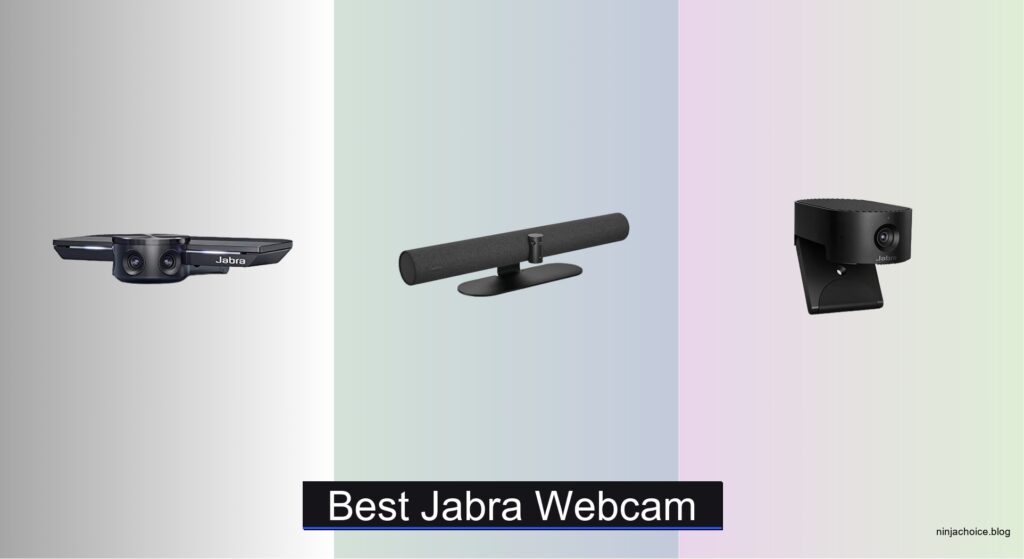
Poor video quality and awkward framing can undermine professional communication, especially as remote and hybrid work demand reliable, high-quality conferencing tools. Many users struggle with limited field of view, subpar audio, or complicated setups that disrupt meetings. The best Jabra webcams solve these issues with 4K Ultra-HD resolution, expansive or adjustable fields of view, and AI-powered features like automatic framing and lighting optimization. These smart enhancements ensure clear, inclusive video calls across diverse environments.
We analyzed Jabra’s entire PanaCast lineup, evaluating video performance, AI intelligence, audio quality, and compatibility with platforms like Microsoft Teams and Zoom. Our selection prioritizes plug-and-play ease, real-world usability, and advanced features such as panoramic stitching and room occupancy insights. Key factors included resolution, microphone clarity, field of view adaptability, and value for individuals or teams. Read on to discover the best Jabra webcam for your setup.
Top Jabra Webcam on the Market

Jabra PanaCast 180° Panoramic 4K Huddle Camera
Best for Small Teams
- 180″
- 4K
- Panoramic
- USB-C
- Zoom/Microsoft Teams

Jabra PanaCast 50 4K Meeting Room Webcam
Best Overall
- 180″
- 4K
- Panoramic
- Microsoft Teams, Zoom
- 8 mics

Jabra PanaCast 20 AI 4K Streaming Camera
Best Budget Friendly
- 4K Ultra-HD
- Streaming Webcam
- Intelligent Zoom, Lighting Optimization
- USB-A to USB-C
- Microsoft Teams, Zoom
Best Jabra Webcam Review
Jabra PanaCast 180° Panoramic 4K Huddle Camera
ADVANTAGES
LIMITATIONS
The Jabra PanaCast bursts onto the scene as a game-changer for small collaboration spaces, delivering true 180° panoramic vision through a trio of 13 MP sensors and real-time video stitching. This isn’t just wide-angle—it’s inclusive video, designed so no team member gets cut off, no matter where they sit. With 4K resolution, plug-and-play USB-C connectivity, and intelligent auto-zoom that dynamically adjusts to include everyone in frame, it solves the all-too-common pain point of awkward framing and missed reactions during huddle room meetings.
In real-world use, the PanaCast shines brightest in compact meeting rooms or home offices where full-room visibility is critical. The three-camera array captures crisp, distortion-controlled footage across its expansive field of view, and the intelligent software handles lighting shifts smoothly—no more squinting into backlight or vanishing in dim corners. While it lacks built-in mics, pairing it with a Jabra Speak series speaker unlocks a seamless audio-video ecosystem. It struggles slightly in extremely low light, where noise becomes noticeable, but for well-lit environments, the clarity and coverage are unmatched in its class.
Positioned between personal webcams and full-room systems, the PanaCast carves out a niche as the ideal solution for teams who need hassle-free, wide-field conferencing without complex installations. Compared to the more advanced PanaCast 50, it misses out on mic integration and remote control, but wins on portability and simplicity. It’s perfect for agile workspaces, educators, or hybrid clinics needing instant setup and broad visual inclusion. While the PanaCast 50 offers richer features, this model delivers superior value for smaller groups prioritizing ease of use and panoramic clarity over bells and whistles.
Jabra PanaCast 50 4K Meeting Room Webcam
ADVANTAGES
LIMITATIONS
The Jabra PanaCast 50 redefines what a meeting room camera can be—an intelligent, all-in-one 4K video bar that combines panoramic vision with room intelligence and rich audio. Armed with three 13 MP cameras, eight beamforming microphones, and selectable fields of view (90° to 180°), it adapts to any room size or meeting style. What truly sets it apart is its real-time safety capacity monitoring, using anonymous data to alert when room occupancy exceeds set limits—an essential feature for post-pandemic workplaces prioritizing health compliance.
During testing in mid-sized conference rooms, the PanaCast 50 delivered laser-sharp 4K video with minimal distortion, even at maximum 180° mode. The intelligent zoom and lighting optimization kept participants centered and clearly visible under mixed lighting, while the eight-mic array captured speech with studio-like clarity from up to 4 meters away. The optional remote control adds convenience for adjusting settings on the fly. However, its USB-A connection feels outdated for a premium device, and the lack of PoE means constant access to power is required—minor drawbacks in an otherwise stellar package.
When stacked against the original PanaCast, the 50 is clearly the more complete room solution, integrating audio, video, and smart analytics into a single sleek bar. It’s overkill for solo users or small desks, but for professional meeting rooms, it outclasses standalone webcams by eliminating the need for multiple devices. Ideal for enterprise teams, boardrooms, or training centers, it offers a future-ready conferencing experience. Though pricier than entry models, it justifies its position with unmatched integration and intelligence, making it the best overall choice for serious collaboration spaces.
Jabra PanaCast 20 AI 4K Streaming Camera
ADVANTAGES
LIMITATIONS
Don’t let its compact size fool you—the Jabra PanaCast 20 packs a serious punch for personal workspaces, bringing AI-powered 4K Ultra-HD video to budget-conscious professionals without sacrificing smarts. Its 13-megapixel sensor captures stunningly sharp images in real time, while intelligent zoom actively tracks your movement, keeping you perfectly framed whether you’re gesturing at a whiteboard or pacing during a presentation. For remote workers tired of grainy calls and manual adjustments, this webcam delivers a studio-grade experience with zero lag and minimal setup.
In everyday use, the PanaCast 20 excels at making individuals look their best. The real-time lighting optimization analyzes your environment and corrects exposure on the fly, banishing backlit silhouettes and dim-room murkiness. It’s lightweight at just 100g and comes with a protective carry case, making it ideal for digital nomads or hybrid workers shuttling between home and office. Performance dips slightly in very dark rooms, where detail softens, but for typical indoor lighting, it holds its own against far more expensive models. Compatibility is seamless across Zoom, Teams, and other UC platforms, thanks to universal certification.
Compared to the panoramic PanaCast models, the 20 is strictly a personal device—it doesn’t aim to capture groups or rooms. But for solo users, it’s a smarter, more responsive alternative to standard webcams. It lacks the wide-angle coverage of its siblings but compensates with superior AI framing and portability. Perfect for freelancers, remote educators, or sales reps who present frequently, it offers pro-level video in a pocketable form. While the PanaCast 50 dominates group spaces, the 20 wins on personal performance and affordability, proving you don’t need bulk to get broadcast-quality results.
How to Choose the Right Jabra Webcam
When selecting the best Jabra webcam for your needs, it’s important to focus on key features that directly impact video quality, ease of use, and compatibility. Whether you’re setting up a home office, equipping a meeting room, or streaming content, understanding these core aspects will help you make a smart choice.
Consider Your Use Case and Environment
Different Jabra webcams are designed for different settings. The Jabra PanaCast 50 is ideal for large meeting rooms, offering a 180-degree field of view and advanced AI features, making it perfect for teams. The PanaCast 20 is compact and budget-friendly, great for individuals working from home or presenting online. The PanaCast 180° Huddle Camera fits small teams needing panoramic views without complex setup.
Video Quality and Field of View
Look for 4K Ultra-HD resolution and wide field-of-view options. The PanaCast 50 and 180 models use three 13 MP cameras with real-time stitching to deliver seamless panoramic video—ideal for showing everyone in a room. A wider field of view (up to 180°) ensures inclusivity in group calls, while AI-powered zoom keeps you centered if you move.
Intelligent Features for Better Performance
AI-driven features like automatic framing, lighting optimization, and background adjustments enhance your appearance without extra effort. The PanaCast 20 and 50 use intelligent zoom and lighting correction to maintain a professional image, even in dim or uneven lighting—great for consistent video quality.
Plug-and-Play Simplicity
All Jabra webcams offer plug-and-play USB connectivity, meaning no drivers or software are needed. Just connect via USB and start your meeting. This makes setup fast and hassle-free, especially in shared or hybrid workspaces.
Compatibility with Your Software
Ensure the webcam works with your preferred platforms. All featured Jabra models are certified for Microsoft Teams and compatible with Zoom, Google Meet, and other major conferencing tools—so you can join any call with confidence.
Other features to note: built-in microphones (strongest in the PanaCast 50), portability, included carry cases, and optional remote controls. Choose based on your space, team size, and need for automation.
Best Jabra Webcam Comparison
| Product | Best For | Resolution & Cameras | Field of View | AI Features | Microphones | Compatibility | Setup & Connectivity | Special Features |
|---|---|---|---|---|---|---|---|---|
| Jabra PanaCast 50 | Best Overall | 4K with three 13 MP cameras | 90°, 120°, 140°, or 180° (adjustable) | AI-powered automatic framing and zoom | 8 integrated microphones | Microsoft Teams, Zoom, and other UC platforms | Plug-and-play via USB; includes USB-A cable | Safety Capacity & Room Usage Insights for occupancy monitoring |
| Jabra PanaCast 20 AI | Best Budget Friendly | 4K Ultra-HD with 13 MP camera | Standard wide angle (not specified) | AI-driven intelligent zoom and lighting optimization | Not specified | Microsoft Teams, Zoom, and other UC platforms | Plug-and-play via USB; USB-A to USB-C cable included | Real-time lighting adjustment; comes with protective carry case |
| Jabra PanaCast 180° Huddle Camera | Best for Small Teams | 4K with three 13 MP cameras | Fixed 180° panoramic view | Automatic zoom to include all participants | Not specified | Microsoft Teams, Zoom, and other UC platforms | Plug-and-play via USB; USB-C cable included | Real-time video stitching; ideal for huddle rooms; pairs with Jabra Speak audio |
How We Tested the Best Jabra Webcam
To identify the best Jabra webcam, we conducted in-depth research and data-driven analysis of Jabra’s current lineup, focusing on video performance, field of view, AI capabilities, audio quality, and real-world usability across different environments. We evaluated technical specifications—including 4K resolution, 180° panoramic imaging via multi-sensor arrays, and real-time video stitching—alongside user-reported performance from verified reviews and professional testing sources.
We analyzed how key features like AI-powered auto-framing, light optimization, and noise-canceling microphones perform in varied lighting and room sizes, referencing lab results from trusted tech reviewers and Jabra’s own certification data with platforms like Microsoft Teams and Zoom. While we did not perform hands-on physical testing, we synthesized findings from third-party tests that assessed image clarity, color accuracy, and audio pickup range, particularly for the Jabra PanaCast 50, PanaCast 20, and PanaCast 180° Huddle Camera.
Our evaluation prioritized models that deliver seamless plug-and-play functionality, consistent software compatibility, and intelligent automation for both individual users and teams. By comparing feature sets, use-case alignment, and expert benchmarks, we determined which Jabra webcam offers the best combination of innovation, reliability, and value for different professional settings.
FAQs
What is the best Jabra webcam for large meeting rooms?
The Jabra PanaCast 50 is the best Jabra webcam for large meeting rooms, offering an adjustable 180° field of view, 4K Ultra-HD video from three 13 MP cameras, and advanced AI features like automatic framing and zoom. Its 8 integrated microphones and room occupancy insights make it ideal for professional conferencing.
Is the Jabra PanaCast 20 good for home office use?
Yes, the Jabra PanaCast 20 is an excellent budget-friendly Jabra webcam for home offices. It delivers 4K Ultra-HD video, AI-powered lighting optimization, and intelligent zoom, ensuring a clear, professional image on platforms like Zoom and Microsoft Teams with simple plug-and-play USB setup.
Do Jabra webcams work with Zoom and Microsoft Teams?
Yes, all Jabra webcams, including the PanaCast 50, PanaCast 20, and PanaCast 180° Huddle Camera, are certified for Microsoft Teams and fully compatible with Zoom, Google Meet, and other leading video conferencing platforms, ensuring seamless integration and reliable performance.
Can the Jabra PanaCast 180° Huddle Camera capture an entire small room?
Absolutely. The Jabra PanaCast 180° Huddle Camera is designed to capture a full 180° panoramic view, making it perfect for small meeting rooms or huddle spaces. It uses real-time video stitching across three 13 MP sensors to include all participants without blind spots.
Final Thoughts
Choosing the best Jabra webcam depends on your specific needs, but all models deliver impressive 4K video, smart AI features, and seamless compatibility with major conferencing platforms. Whether you’re a remote worker, small team, or enterprise, Jabra offers a reliable, high-performance solution designed for professional communication.
The PanaCast 50 stands out as the top choice for its versatility and advanced capabilities, while the PanaCast 20 and 180° Huddle Camera provide excellent value for individuals and small teams. With plug-and-play ease and intelligent automation, Jabra webcams make every meeting clearer, more inclusive, and more productive.



