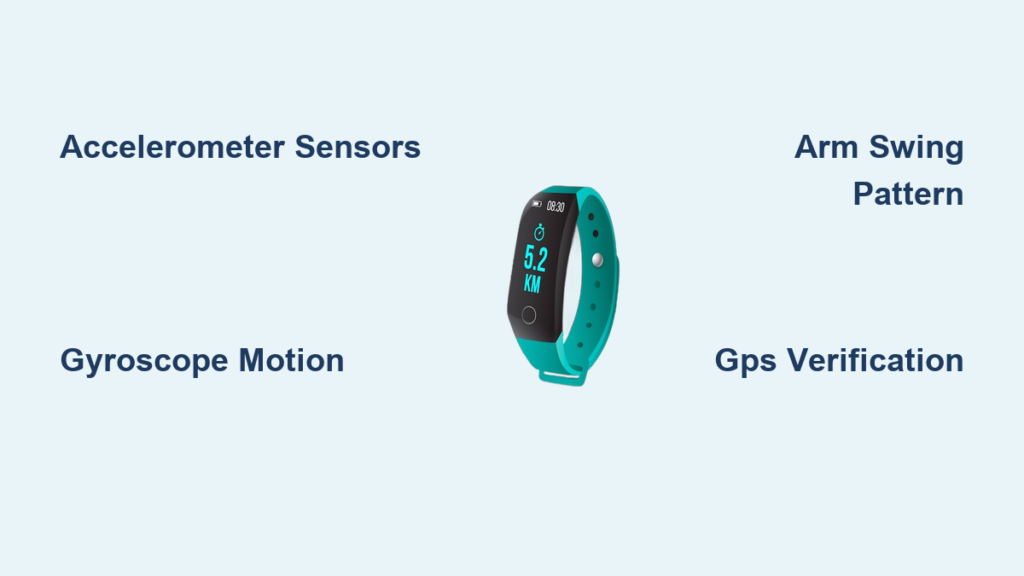
Your fitness tracker clicks upward with every stride, but have you ever wondered how that sleek wristband actually knows you’re walking? The answer isn’t magic—it’s a precision dance between microscopic sensors and intelligent algorithms working 24/7 to translate your movement into step counts. When you take that morning walk or hustle between meetings, your device isn’t just guessing; it’s analyzing complex motion patterns to distinguish purposeful steps from everyday fidgeting.
This sophisticated process happens silently beneath the surface, yet it’s remarkably easy to misunderstand. Many assume fitness trackers use simple motion detectors like pedometers of old, but modern devices face a constant challenge: separating true footsteps from typing, driving on bumpy roads, or even chopping vegetables. The real breakthrough lies in how these devices interpret human movement through advanced physics and computing.
In this guide, you’ll discover exactly how your tracker transforms wrist vibrations into accurate step data, why accuracy varies between activities, and what you can do to maximize reliability. We’ll break down the sensor technology, decoding algorithms, and real-world factors that determine whether your 10,000-step goal is truly earned.
Why Your Wrist Motion Translates to Step Counts
Your fitness tracker’s step-counting ability hinges on one critical biological truth: walking creates predictable rhythmic motion. When you take a step, your foot strikes the ground with measurable force while your arm swings in a counterbalancing arc. This dual motion generates distinct acceleration patterns that sensors can detect—but only if they’re designed to recognize human gait specifically.
The device doesn’t count steps through direct observation. Instead, it monitors microscopic shifts in acceleration forces along three spatial planes. As your foot hits the pavement, the impact sends a vibration up your arm that registers as a spike in the sensor data. Simultaneously, your natural arm swing creates a secondary motion signature. Together, these form a fingerprint that algorithms identify as a legitimate step.
Without this dual-motion verification, your tracker would count every hand gesture or car bump as a step. The system’s brilliance lies in requiring both vertical impact (from footfalls) and horizontal arm swing to confirm locomotion. This eliminates false positives from activities like typing or cooking, where you might move your arm but lack the foot-strike component.
Spotting the Human Motion Fingerprint
What makes walking unique among human motions? The alternating left-right rhythm creates a cadence typically between 80-120 steps per minute. Your tracker’s software constantly analyzes motion frequency to distinguish walking from random movements. When it detects consistent, repeating acceleration spikes within this range, it flags potential steps.
The vertical axis (up-down motion) is particularly crucial. Each footfall generates a brief but sharp acceleration spike as your foot decelerates upon ground contact. This impact signature differs significantly from smooth motions like stirring soup or gesturing while talking. Advanced trackers even measure spike intensity—light footsteps from shuffling indoors register differently than vigorous outdoor strides.
Why Arm Swing Matters More Than You Think
Your natural arm swing isn’t just a side effect of walking—it’s a critical data point. The gyroscope tracks how your wrist rotates with each stride. During proper walking, your right arm swings forward as your left foot steps forward, creating a counter-rotational pattern. Trackers compare this rotation data against the accelerometer’s impact spikes.
If the device detects footfall-like vibrations but no corresponding arm swing (like when pushing a stroller), it suppresses step counting. This explains why accuracy drops during activities that restrict natural arm motion. The system essentially asks: “Are the foot impact and arm swing happening together in the right sequence?” Only when both align does it count a step.
Accelerometer Deep Dive: How Footfall Force Becomes Data
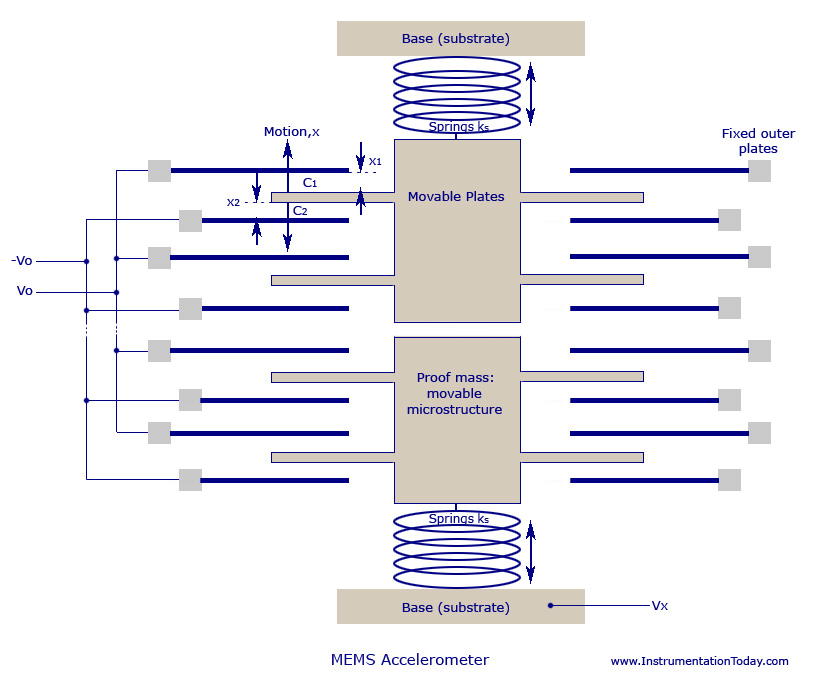
At the heart of every step count lies the MEMS accelerometer—a chip smaller than a grain of rice that measures acceleration changes in three dimensions. As you walk, this sensor captures the precise moment your foot strikes the ground through sudden deceleration forces. When your heel hits the pavement, your body briefly slows down, creating a measurable negative acceleration spike along the vertical axis.
This isn’t a simple on-off switch. The accelerometer records continuous data streams at 50-100 samples per second, creating a detailed motion graph. Each step appears as a characteristic “spike-and-valley” pattern: a sharp upward spike as your foot impacts, followed by a downward valley as your body moves over your planted foot. The algorithm scans for this specific waveform shape amid background noise.
Impact Spike Analysis: Separating Steps from Bumps
Not all acceleration spikes equal steps. Your tracker uses amplitude thresholds to ignore minor vibrations. A true footfall typically generates 1.2-1.8g of force (where g is gravity’s pull), while typing might create only 0.3g movements. The device’s software filters out anything below the step-force threshold.
Crucially, it also checks spike duration. Foot impacts last 50-150 milliseconds—longer than a keyboard tap but shorter than a car bump. By analyzing both force intensity and spike length, the algorithm distinguishes walking from driving on rough roads. This dual-filter system prevents your commute from inflating your step count.
Tri-Axis Verification: Why Three Dimensions Matter
Single-axis sensors (like old pedometers) frequently miscount steps because they detect any vertical motion. Modern trackers use three-axis accelerometers to confirm genuine walking patterns. During proper gait:
– Vertical axis shows impact spikes
– Forward-backward axis reveals arm swing motion
– Side-to-side axis detects minimal sway
The algorithm requires coordinated motion across all three planes. If you’re chopping vegetables, you might get vertical spikes from knife impacts, but without the characteristic horizontal arm swing pattern, it won’t count as steps. This multi-dimensional verification is why wrist trackers outperform pocket devices—they capture the full gait signature.
Gyroscope Integration: Eliminating False Positives
While accelerometers detect linear motion, gyroscopes measure rotational movement—tracking how your wrist twists and turns during activity. This sensor is vital for distinguishing walking from activities that mimic footfall vibrations. When you type vigorously, your arm moves vertically but with minimal rotation. True walking creates consistent 15-25 degree wrist rotations with each stride.
The gyroscope provides critical context for ambiguous accelerometer data. Imagine driving on a bumpy road: the accelerometer detects vertical jolts similar to steps, but the gyroscope shows no arm swing rotation. The algorithm compares these datasets—if rotation data doesn’t match expected walking patterns, it suppresses step counting. This cross-verification reduces false positives by up to 40% compared to accelerometer-only systems.
Arm Swing Pattern Recognition
Your natural arm swing follows a specific biomechanical rhythm during walking. As your left foot steps forward, your right arm swings forward in counterbalance, creating a diagonal rotation pattern. The gyroscope maps this motion by tracking:
– Rotation speed (typically 0.5-1.5 revolutions per second during walking)
– Swing arc width (usually 20-30 degrees)
– Consistent left-right alternation
When pushing a shopping cart, your arms remain relatively straight with minimal rotation. The gyroscope detects this restricted motion pattern and signals the algorithm to reduce step sensitivity. This explains why your tracker might count only 70% of actual steps during cart-pushing—it’s not broken; it’s correctly identifying unnatural gait.
Rotation Rate Thresholds: The Speed Check
Gyroscopes add a crucial speed verification layer. Human walking creates rotational velocities between 30-100 degrees per second, while random hand movements often exceed 150 degrees per second. The algorithm calculates rotation speed from gyroscope data and discards motions outside the walking range.
This prevents activities like hand-clapping or drumming from registering as steps. Even vigorous cooking—where you might rapidly stir a pot—gets filtered out because the rotation rate exceeds natural walking parameters. Only motions matching both the force signature (accelerometer) and rotation profile (gyroscope) earn step credit.
Why Pushing a Stroller Skews Your Step Count
When you push a stroller or shopping cart, your step count often falls short of reality—and there’s a precise technical reason. These activities suppress the natural arm swing that trackers rely on for step verification. With arms extended forward and relatively straight, your wrist rotation drops by 60-80% compared to free walking. The gyroscope detects this restricted motion pattern and triggers the algorithm’s “reduced confidence” mode.
Simultaneously, the vertical impact from footfalls becomes less pronounced. Without the counterbalancing arm swing, your body absorbs more shock through your legs and torso, dampening the acceleration spikes the accelerometer expects. The device essentially sees “foot motion without matching arm motion”—a red flag for non-walking activity.
How Trackers Compensate (and Why It’s Not Perfect)
Modern algorithms attempt to adjust for cart-pushing scenarios using two strategies:
1. Cadence-based estimation: If consistent footfall rhythm continues without arm swing, it may count steps at 70-80% of normal sensitivity
2. Duration analysis: Brief cart-pushing intervals might get full credit, but sustained periods trigger undercounting
Unfortunately, these workarounds remain imperfect because the core motion signature is altered. The tracker can’t fully compensate for the missing biomechanical components it uses to verify steps. This explains why your 20-minute stroller walk might show only 1,200 steps instead of the expected 1,800.
Optimal Solutions for Cart-Pushing Accuracy
For more accurate counts during restricted-motion activities:
– Wear the tracker on your ankle (if compatible) where foot impact remains unaltered
– Use GPS-based tracking during outdoor walks—the location data confirms movement
– Manually add steps in your app’s log for these specific activities
– Choose trackers with barometric sensors that detect elevation changes from walking
These methods bypass the arm-motion dependency, giving you credit for steps the wrist sensor misses. Remember: undercounting during cart-pushing indicates your tracker is working correctly—it’s filtering out motions that don’t match its verified walking signature.
Personal Calibration: Tailoring Accuracy to Your Stride
Generic algorithms assume an “average” human stride, but your unique gait affects step-counting precision. Tall users with long strides create different acceleration patterns than shorter individuals—the force per step varies significantly. Without personalization, your tracker might count two long strides as one step (undercounting) or split one stride into multiple steps (overcounting).
The solution lies in calibration. By walking a known distance (like a measured 100-foot hallway), you teach your device your exact stride length. During calibration mode, the tracker:
1. Counts steps over the fixed distance
2. Calculates your personal stride length (distance ÷ step count)
3. Adjusts future step-to-distance conversions
This doesn’t change step counting directly but improves distance accuracy, which indirectly refines step validation. Some advanced trackers like Garmin watches use this data to tweak acceleration thresholds for your specific impact force.
Machine Learning’s Role in Gait Adaptation
High-end devices take calibration further through continuous machine learning. As you wear the tracker daily, it builds a personalized motion profile by:
– Noting your typical walking cadence
– Recording your unique arm swing amplitude
– Mapping your footfall impact intensity
Over 2-4 weeks, the algorithm weights your personal patterns more heavily than generic models. This explains why accuracy often improves after initial setup—the tracker is learning your walking signature. When it detects motion matching your historical pattern, it counts steps with higher confidence.
When Calibration Isn’t Enough
Certain biomechanical factors remain challenging even with calibration:
– Asymmetrical gaits (from injuries or conditions) create uneven sensor patterns
– Rollator walkers eliminate natural arm swing entirely
– Treadmill walking produces different vibration signatures than outdoor surfaces
For these scenarios, consider supplemental tracking methods like shoe-based sensors that directly measure foot impact. Your wrist tracker will still provide valuable relative data (comparing daily totals), but absolute step counts may require cross-verification.
GPS Integration: Verifying Movement Type for Better Accuracy
When your fitness tracker connects to GPS, it gains a powerful truth-check for step counting. While sensors detect motion, GPS confirms whether that motion equals actual locomotion. During a walk, GPS data verifies:
– Consistent speed between 2-5 mph (walking pace)
– Continuous positional changes
– Straight-line movement patterns
This contextual data resolves ambiguous sensor readings. If the accelerometer detects step-like vibrations but GPS shows no location change (you’re stationary), the algorithm discards those as false positives. Conversely, if GPS confirms movement but sensor data is weak (like during cart-pushing), it may boost step-counting sensitivity.
How GPS Prevents Cycling Miscounts
One critical application is distinguishing walking from cycling. Without GPS, arm motion while cycling could register as steps—the handlebar grip creates rhythmic vibrations similar to arm swings. But GPS reveals your speed (typically 8-15+ mph during cycling), instantly triggering the algorithm to suppress step counting. This is why dedicated cycling modes disable step tracking entirely.
The Battery Trade-Off
Continuous GPS use drains battery life 30-50% faster, so most trackers only activate it during mapped workouts. For all-day step counting, they rely on sensor fusion alone. This explains why your step count might be less accurate during casual daytime movement compared to a GPS-logged walk. Consider manually starting GPS walks for critical accuracy needs, but expect shorter battery life between charges.
Common False Positives: Activities That Trick Your Tracker
Vigorous typing creates rapid vertical wrist motions that mimic footfall spikes—especially on mechanical keyboards. Your tracker may count 10-20 “steps” per minute of typing because the accelerometer detects repetitive impacts similar to walking. The gyroscope usually catches this (typing lacks natural arm swing rotation), but intense typing sessions can still inflate counts by 200-300 steps.
Driving on Bumpy Roads: The Silent Step Inflator
Car vibrations present the most common false positive. Rough roads generate vertical accelerations that perfectly match footfall signatures. Without GPS context, your tracker can’t distinguish driving from walking. A 30-minute commute might add 500-800 phantom steps. Modern devices mitigate this through:
– Speed filtering (discarding vibrations when GPS shows >5 mph)
– Duration analysis (long vibration sequences without cadence breaks get ignored)
– Motion pattern recognition (car vibrations lack walking’s rhythmic spike pattern)
Still, short trips on gravel roads remain problematic. If your step count jumps unexpectedly after driving, check your activity log—those “steps” likely came from potholes, not pavement.
Other Step-Counting Culprits
- Chopping vegetables: Vertical knife motions create impact spikes
- Handwashing: Vigorous scrubbing mimics arm swing rhythm
- Public transit: Train vibrations resemble walking patterns
- Sleeping: Tossing/turning may register as slow steps
To minimize errors, wear your tracker snugly (loose bands amplify motion artifacts) and avoid rapid hand gestures during critical counting periods. Remember: occasional inaccuracies don’t undermine your tracker’s value—consistent daily patterns remain the most meaningful metric.
Optimal Placement Strategies for Maximum Step Accuracy
Wrist placement significantly impacts step-counting precision. For most users, the non-dominant wrist provides the cleanest signal because:
– Dominant hands create more random motion (typing, gesturing)
– Non-dominant arm swing has less “noise” from daily tasks
– Wrist rotation patterns are more consistent during walking
However, during activities like pushing strollers, dominant-wrist placement may capture more natural arm motion if you’re steering with that hand. Test both positions during your typical activities to see which yields more consistent counts.
When Pocket Placement Backfires
Carrying your tracker in a pocket seems logical but often reduces accuracy. Without wrist rotation data, the algorithm loses critical gait verification. Pocket motion also:
– Dampens vertical impact spikes (fabric absorbs shock)
– Creates irregular swinging motions
– Generates false positives from leg swings
Pocket tracking typically undercounts steps by 15-25% compared to wrist placement. If you must pocket your device, choose tight-fitting pants pockets to minimize extraneous motion.
The Ankle Advantage (For Pure Step Counting)
For maximum step-counting accuracy—especially during restricted-motion activities—ankle placement is superior. Strapped to your shoe or ankle:
– Foot impact vibrations register directly
– Arm swing restrictions become irrelevant
– Step detection accuracy approaches 95%
The trade-off is convenience and social acceptability. Few people wear trackers on ankles daily, but consider this placement for critical accuracy needs like physical therapy. Some medical-grade trackers (like StepWatch) use this method specifically for clinical precision.
Final Note: Your fitness tracker’s step count isn’t a perfect tally—it’s an intelligent estimate based on biomechanical signatures. Understanding its sensor-driven methodology helps you interpret data realistically: focus on daily trends rather than absolute numbers, calibrate for your stride, and recognize activity-specific limitations. For most health goals, consistent tracking patterns matter far more than pinpoint accuracy. When in doubt, pair wrist data with periodic manual counts during known walks to build personal confidence in your device’s readings.