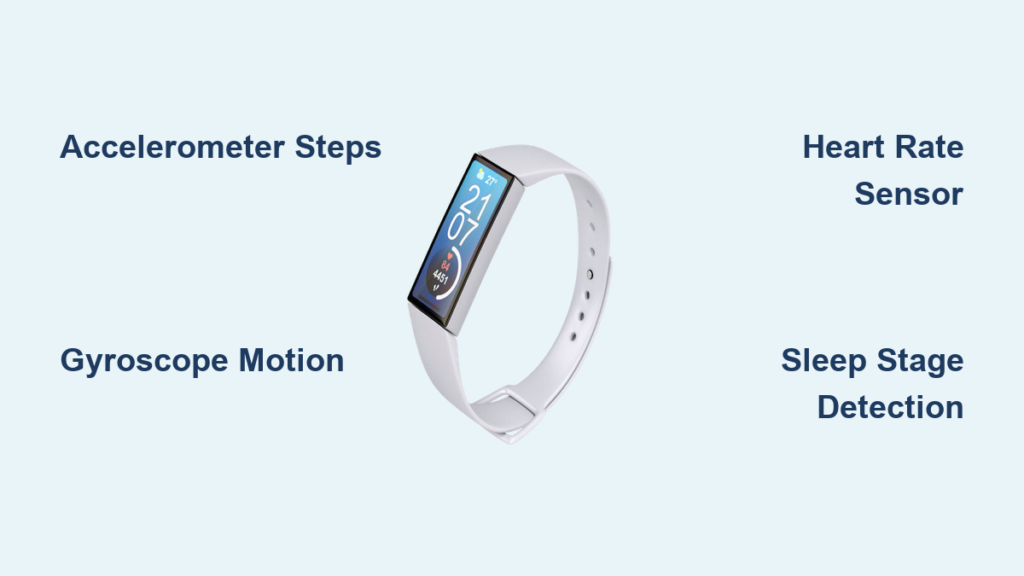
You’ve probably glanced at your wrist dozens of times today to check your step count, heart rate, or sleep score. But have you ever stopped to wonder exactly how that sleek device transforms simple movements into detailed health metrics? Understanding how does fitness tracker work reveals a fascinating blend of physics, engineering, and data science packed into a device smaller than your thumb. These wearables have moved beyond simple step counters to become sophisticated health companions that monitor everything from your stress levels to oxygen saturation.
Despite their unassuming appearance, fitness trackers contain multiple precision sensors working in concert to capture your body’s subtle movements and physiological signals. The magic happens when these raw sensor readings get transformed into meaningful insights through complex algorithms. Whether you’re trying to understand why your sleep score dropped or wondering how it counts stairs without you telling it to climb, knowing the inner workings helps you interpret the data more accurately and get the most value from your device.
This comprehensive explanation will demystify the technology inside your wearable, showing you exactly what happens between your physical activity and the metrics displayed on your phone. You’ll discover why certain activities confuse your tracker, how to improve data accuracy, and what limitations to be aware of when making health decisions based on your tracker’s readings.
Tri-Axial Accelerometers: The Heartbeat of Step Counting Accuracy

Your fitness tracker’s ability to count steps stems primarily from a tiny but powerful component called a tri-axial accelerometer. This sensor measures acceleration forces in three dimensions—side-to-side, forward-backward, and up-down—creating a complete picture of your movement patterns. When you take a step, the rhythmic pattern of acceleration and deceleration creates a distinctive waveform that the device recognizes as walking or running motion.
How Acceleration Data Translates to Step Counts
The accelerometer continuously samples movement data at high frequency (typically 25-100 times per second), creating a stream of numerical values representing motion intensity. Sophisticated algorithms then analyze this data stream, looking for periodic patterns that match human gait characteristics. The device filters out random movements like typing or gesturing while identifying the consistent rhythm of footsteps. When the pattern matches walking parameters (duration, intensity, regularity), the tracker increments your step count.
Why Wrist Placement Matters for Accurate Tracking
For optimal step counting, your tracker must be worn snugly on the wrist with the screen facing up. Loose fitting allows excessive movement unrelated to your gait, causing overcounting. Research shows that wearing your device too high on the forearm or too low near the hand can reduce step counting accuracy by up to 15%. Pro Tip: When pushing a stroller or shopping cart, your natural arm swing is restricted, which may cause undercounting—manually adding these activities in your app compensates for this limitation.
Gyroscopes: Detecting Complex Movements Beyond Simple Steps
While accelerometers track linear motion, gyroscopes measure rotational movement and orientation, adding crucial context to activity recognition. This sensor detects how the device is tilted or rotated in three-dimensional space, allowing your tracker to distinguish between different types of movement that might have similar acceleration patterns.
How Rotation Sensors Differentiate Between Activities
When you perform exercises like push-ups, yoga poses, or cycling, your body moves in complex ways that accelerometers alone can’t fully interpret. The gyroscope provides data about angular velocity and orientation changes, helping the device recognize that your arms are moving in a circular pattern during cycling rather than the back-and-forth motion of walking. This combined sensor data enables automatic activity detection that switches seamlessly between workout modes without manual input.
Common Misinterpretations of Gyroscope Data
Despite their sophistication, gyroscopes can sometimes misinterpret movements, particularly during activities with unusual motion patterns. For example, vigorous hand washing might register as exercise, or certain dance moves could be misclassified. Warning: If you notice consistent misclassification of specific activities, manually starting that activity mode before exercising ensures more accurate tracking and calorie calculation.
Optical Heart Rate Monitoring: Shining Light on Your Pulse
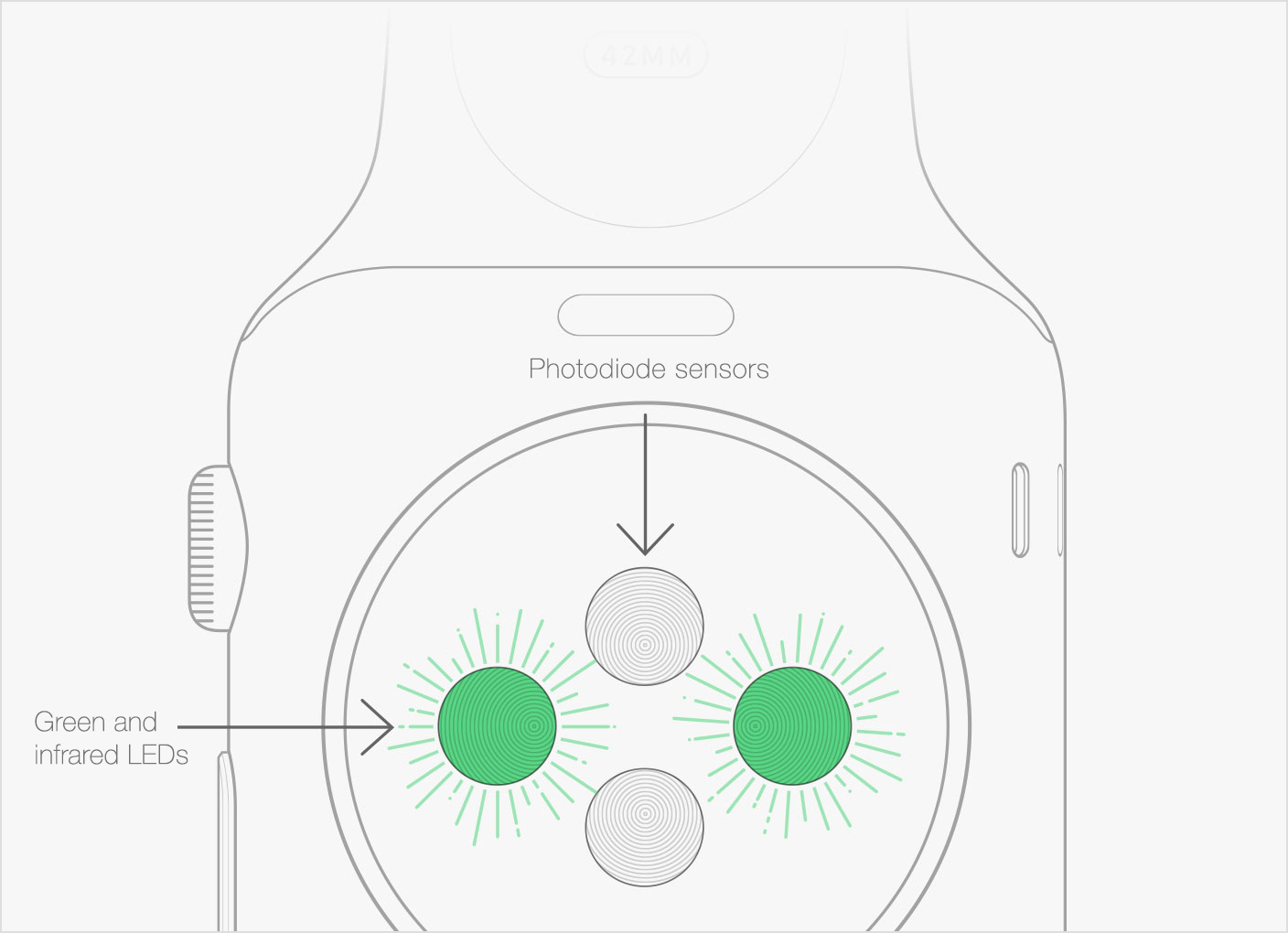
The green lights you see pulsing on the back of your fitness tracker aren’t just for show—they’re actively measuring your heart rate through a technology called photoplethysmography (PPG). This non-invasive method uses light absorption principles to detect blood volume changes in your capillaries with each heartbeat.
The Science Behind Green LED Photoplethysmography
Your tracker emits green LED light into your skin, where it penetrates tissue and interacts with blood flowing through capillaries. Since blood absorbs green light while reflecting red light, the photodetector on your device measures the amount of light reflected back. With each heartbeat, more blood flows through the capillaries, absorbing more green light and causing detectable fluctuations in the reflected signal. Advanced signal processing filters out motion artifacts and converts these light variations into your real-time heart rate.
Why Heart Rate Readings Sometimes Fluctuate Unexpectedly
Several factors can cause temporary inaccuracies in optical heart rate monitoring:
– Skin tone and tattoos: Darker skin or tattoos can absorb more light, requiring stronger signal processing
– Wrist placement: Looseness or improper positioning creates gaps between sensor and skin
– Rapid movement: High-intensity interval training creates motion artifacts that interfere with readings
– Cold temperatures: Reduced peripheral blood flow makes detection more challenging
Pro Tip: For the most accurate heart rate readings during exercise, wear your tracker one finger width above your wrist bone and ensure it’s snug but comfortable.
Sleep Stage Detection: How Your Tracker Analyzes Rest Patterns
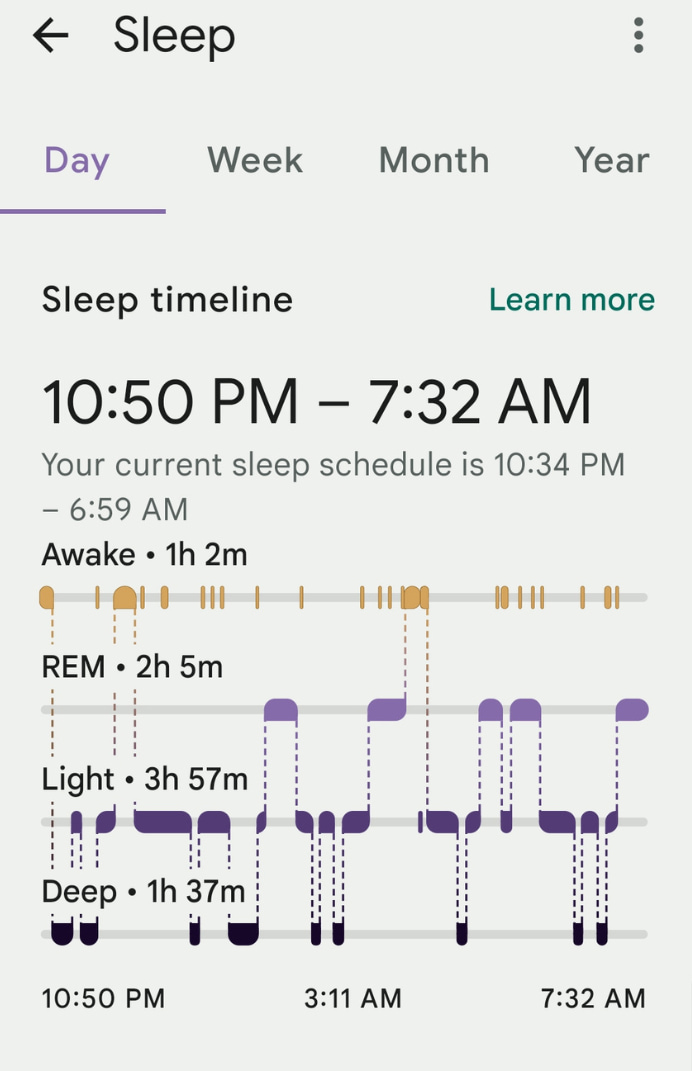
Your fitness tracker builds a comprehensive sleep profile by combining movement data from the accelerometer with heart rate variability patterns. During deep sleep, your body moves minimally and your heart rate slows with regular variability, while REM sleep shows more movement and irregular heart rate patterns characteristic of dreaming.
Combining Movement and Heart Rate Data for Sleep Assessment
While you sleep, your tracker monitors:
– Micro-movements indicating restlessness or position changes
– Heart rate dips that typically occur during deep sleep
– Heart rate variability patterns that distinguish REM from light sleep
– Breathing rate inferred from subtle chest movements
The device analyzes these factors against established sleep physiology models to estimate your time in each sleep stage, creating a sleep score that reflects overall rest quality.
Improving Sleep Tracking Accuracy Through Proper Wear
For reliable sleep data:
– Wear your tracker consistently in the same position each night
– Ensure it’s snug enough to maintain skin contact but not so tight it disrupts sleep
– Avoid wearing tight sleeves that might shift the device during the night
– Manually log bedtime and wake time if your tracker doesn’t automatically detect sleep
GPS Integration: Mapping Your Outdoor Workouts Precisely

When tracking outdoor activities like running or cycling, your fitness tracker combines motion data with precise location information to calculate distance, pace, and route mapping. Higher-end models contain built-in GPS chips, while more basic trackers leverage your smartphone’s GPS when paired.
Phone GPS vs. Built-In Tracker GPS: What’s the Difference?
| Feature | Phone GPS | Built-in Tracker GPS |
|---|---|---|
| Battery Impact | Drains phone battery | Preserves phone battery |
| Accuracy | Generally higher | Slightly less precise |
| Convenience | Requires carrying phone | Phone-free tracking |
| Workout Types | All outdoor activities | Limited to supported activities |
Pro Tip: For long runs where you want to leave your phone behind, choose a tracker with built-in GPS. For occasional use, phone-connected GPS conserves your tracker’s battery life.
Algorithms That Transform Raw Data Into Actionable Insights
The true intelligence of your fitness tracker lies not in its sensors but in the sophisticated algorithms that transform raw data into meaningful health metrics. These mathematical models have been trained on massive datasets of human movement and physiology to interpret sensor readings in context.
Machine Learning’s Role in Activity Recognition
Modern trackers use machine learning models that continuously improve their accuracy through exposure to more activity data. When you manually correct an activity misclassification in your app, this feedback helps refine the algorithms for both your device and the broader user community. Over time, your tracker becomes better at recognizing your personal movement patterns and distinguishing between similar activities like hiking versus stair climbing.
Why Your Calorie Count Might Differ From Other Devices
Calorie estimation combines multiple data points:
– Your personal profile (age, weight, height, gender)
– Heart rate intensity
– Movement patterns and duration
– Historical activity data
Different manufacturers use proprietary formulas for these calculations, which is why you might see variations between devices. Important: Calorie counts are estimates—use them for tracking trends rather than absolute values.
Maximizing Your Fitness Tracker’s Accuracy: Pro Tips
You can significantly improve your tracker’s performance with simple adjustments to how you wear and use the device. Understanding how does fitness tracker work empowers you to get the most reliable data from your investment.
Proper Wear Position for Different Tracking Functions
- Step counting: Wear on dominant wrist for most accurate results
- Heart rate monitoring: Position 1-2 cm above wrist bone with snug fit
- Sleep tracking: Wear consistently in same position each night
- Swimming: Ensure waterproof model is securely fastened to avoid water gaps
When to Manually Calibrate Your Device Settings
Take 5 minutes every few months to:
– Verify your personal profile information is current
– Update your device’s software for algorithm improvements
– Perform a manual step calibration by walking a known distance
– Reset heart rate sensor placement if readings seem inconsistent
Understanding how does fitness tracker work transforms you from a passive user to an informed participant in your health journey. While these devices provide valuable insights, remember they’re estimation tools—not medical equipment. Use the data they provide as part of a broader picture of your health, combining it with how you feel, your energy levels, and other wellness indicators. By knowing the technology’s capabilities and limitations, you’ll make better decisions about which metrics to prioritize and when to seek professional medical advice instead of relying solely on your wearable’s readings.